For global buyers, choosing an Ups Inverter means matching equipment to real operating conditions, not just comparing headline wattage. A unit that performs well in a small office may struggle with a pump, server rack, or refrigerator. Load type, startup current, backup duration, and battery compatibility all matter. So does the local power supply.
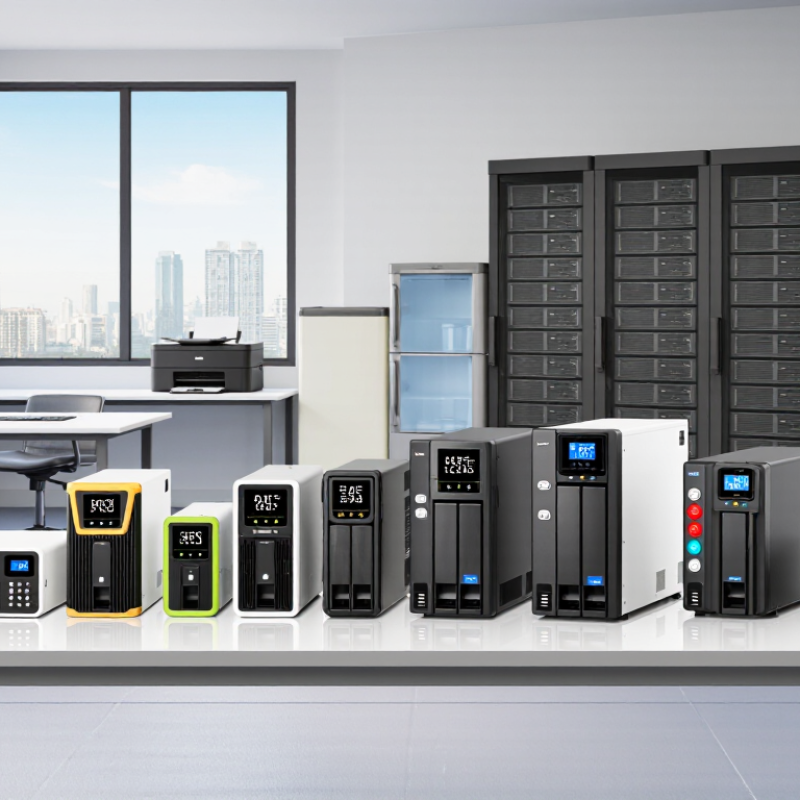
This guide introduces ten common inverter types, from standby and line-interactive models to online, solar-hybrid, and industrial systems. Each design manages outages and voltage changes differently. A line-interactive unit may suit everyday office equipment, while a double-conversion model can provide more consistent power for sensitive devices. These are useful starting points, not universal rules. No single type wins everywhere.
Buyers should check rated output, surge capacity, transfer time, waveform, and supported battery chemistry. Confirm input voltage and frequency against the installation site, especially when sourcing across regions. Ask suppliers for test reports, warranty terms, service options, and clear specifications. Details matter. A printed runtime figure may assume a fresh battery and a modest load, conditions that can differ from daily use. Comparing those assumptions helps prevent costly surprises.
The rankings that follow are intended as a practical overview, not a substitute for an electrical assessment. Product suitability depends on the equipment, environment, and required backup time. Even careful comparisons can miss a constraint. Treat the shortlist as a starting point, then verify the details with the manufacturer or a qualified installer.
A UPS inverter converts direct-current electricity from a battery or DC bus into alternating current for connected equipment. During normal operation, an online double-conversion UPS rectifies incoming AC to DC, then continuously inverts it back to AC. This helps isolate sensitive loads from voltage dips and frequency changes. In standby designs, the inverter usually takes over when utility power fails, so a brief transfer can occur. The difference matters. A server may ride through a short interruption, while sensitive control equipment may not.
The battery is only one part of the system. Inverter capacity, output waveform, cooling, and load behavior also affect performance. A motor’s startup surge, for example, can exceed its steady running demand. The U.S. Department of Energy’s 2024 Lawrence Berkeley National Laboratory report estimates U.S. data centers used about 176 terawatt-hours of electricity in 2023, with use potentially reaching 325–580 terawatt-hours by 2028. Those figures describe the sector, not UPS demand alone. They do show why conversion efficiency and heat deserve attention. Estimates are not guarantees. Real operating conditions can be messier than a specification sheet suggests.
How UPS Inverters Are Classified
UPS inverters are commonly classified by how they handle incoming power. Standby units switch to battery when mains power fails. That short transfer may affect sensitive equipment. Line-interactive models correct moderate voltage changes before drawing from the battery. Online, double-conversion systems continuously convert power from AC to DC and back to AC. This can provide more consistent output for critical loads.
Buyers may also compare output waveform, phase configuration, and rated capacity. A single-phase unit may suit a small office, while larger facilities can require three-phase power. VA and watt ratings help show how much equipment a unit can support. These details describe compatibility and scale, not the inverter’s core operating topology. Labels can blur. Some product descriptions use overlapping terms, so check the technical specifications rather than relying on a type name alone.
Tips: Match the UPS topology to the load and the quality of incoming power. Check both watt and VA limits, then allow room for startup demand. A small mismatch is easy to miss.
Ten Common UPS Inverter Types for Global Buyers
Buyers often compare ten common UPS configurations, though not all are inverter topologies. Standby units suit basic protection; line-interactive designs add voltage regulation; online double-conversion units continuously rebuild output. Delta-conversion and ferroresonant designs serve particular load or voltage needs. Rotary UPS systems use rotating machinery, while modular units add capacity through replaceable blocks. Rack-mount and tower models describe enclosure formats, not electrical behavior. DC UPS systems supply compatible DC loads directly. Terminology can be messy. These categories overlap.
Power demand matters. The IEA’s Energy and AI report estimates data centres used about 415 TWh in 2024. That scale makes efficient backup design material.
IEC 62040-3 sets performance and test requirements for UPS systems; compare declared output performance, not topology labels alone. Check load in watts and volt-amperes, runtime at the actual load, transfer behavior, input voltage range, and service access. A ten-minute runtime may look sufficient on paper. It may not cover a delayed generator start. Site testing can expose that gap.
Top 10 UPS Inverter Types for Global Buyers
How to Compare UPS Inverter Performance and Compatibility
When comparing UPS inverter types, look beyond the product label. Standby units suit basic computers, while line-interactive designs can correct modest voltage swings. Online double-conversion systems provide continuous power conversion for sensitive equipment. Their extra protection may come with higher energy use and cost. Compare the output waveform, too. Some devices tolerate a stepped waveform; pumps, audio equipment, and power-factor-corrected supplies may need a pure sine wave. Check the equipment manual.
Match capacity to real loads, not just nameplate totals. Add running watts, then allow for startup surges from motors or printers. Check transfer time if connected equipment cannot tolerate even a brief interruption. A spec sheet can still mislead. Ratings may use different test conditions, so compare the stated voltage, frequency, load level, and runtime. Test it first.
Compatibility also depends on local input voltage and frequency, battery chemistry, charging limits, and available replacement batteries. A unit designed for one grid standard may not fit another without approved configuration. Confirm connector type and ventilation needs; a warm, enclosed cabinet can shorten battery life. For global purchasing, request test data at the intended load and verify service support in the destination region. Small details matter. A careful comparison may reveal that the simplest suitable inverter is more dependable than a feature-heavy model.
Choosing a UPS inverter starts with the load, not the product label. For a home router or office PC, a standby unit may cover brief outages. Line-interactive models suit locations with frequent voltage dips. Their automatic voltage regulation can reduce unnecessary battery use. For servers, medical equipment, or sensitive control systems, online double-conversion designs provide continuous power conditioning. That extra protection uses more energy and costs more. Match the inverter’s output waveform to the equipment, too; some motors and power supplies behave poorly with stepped approximations.
Size capacity for both running demand and startup surges. A refrigerator, pump, or laser printer can draw far more power briefly than its normal rating suggests. Estimate runtime from the actual load, then allow for battery aging and cold rooms. Uptime Institute’s 2024 outage analysis found that 54% of respondents’ most recent significant outages cost over $100,000. That matters. It makes monitoring, service access, and a tested shutdown plan practical selection criteria, not optional extras. I would still verify the waveform and transfer behavior with the real equipment; datasheets do not tell the whole story. A small load test can expose an awkward mismatch before installation.
| # | UPS Type or Configuration | How It Works | Typical Transfer Behavior | Best-Fit Applications | Main Advantages | Limitations and Selection Notes |
|---|---|---|---|---|---|---|
| 1 | Standby (Offline) UPS | During normal operation, the load is supplied mainly from utility power. The inverter supplies the load when the input falls outside acceptable limits. | Usually a short transfer interruption; check the manufacturer's specified transfer time and the load's ride-through capability. | Home computers, point-of-sale terminals, and other non-critical single-phase equipment. | Simple design, compact size, and generally lower purchase cost. | Provides less continuous voltage conditioning than online double-conversion systems. Not the first choice for loads that cannot tolerate a transfer interval or frequent power disturbances. |
| 2 | Line-Interactive UPS | Uses an inverter and typically automatic voltage regulation to manage some voltage variations without switching to battery for every fluctuation. | Usually has a brief transfer to battery when input power is outside its operating range; actual timing varies by design. | Small offices, network closets, and general-purpose IT equipment where power conditions are moderately stable. | Can correct some overvoltage and undervoltage conditions while reducing battery cycling compared with a basic standby design. | Does not provide the same continuous isolation from input disturbances as double conversion. Check input-voltage range, output waveform, and compatibility with the connected equipment. |
| 3 | Online Double-Conversion UPS | Continuously converts incoming AC to DC and then uses the inverter to supply regulated AC to the load. | Normally no transfer gap when switching between utility-derived power and battery, because the inverter already supplies the load. Bypass operation is a separate condition. | Data centers, medical and laboratory equipment, industrial controls, and other loads needing tightly controlled power. | Strong output regulation and isolation from many input-voltage and frequency variations. | Often costs more and may generate more heat than simpler topologies. Confirm efficiency, cooling requirements, battery runtime, and bypass behavior for the specific model. |
| 4 | Delta-Conversion Online UPS | A form of online UPS that uses an additional conversion path to help regulate input power and manage the difference between input and output power. | The inverter normally supplies the load continuously; confirm transfer and bypass specifications for the particular design. | Larger commercial or data-center installations where efficiency and power conditioning are both important. | Can combine online power conditioning with efficient handling of normal input power, depending on operating conditions and design. | Less commonly available than standard double-conversion systems. Compare published efficiency curves, operating modes, service support, and performance at the expected load. |
| 5 | High-Frequency Transformerless UPS | Uses high-frequency power electronics and typically omits a bulky output isolation transformer. | Depends on the UPS topology; many units use online double conversion, while transfer and bypass behavior remain model-specific. | Commercial IT rooms, office infrastructure, and installations with space or weight constraints. | Often offers a compact footprint and lower weight than a comparable transformer-based design. | Transformerless does not automatically mean suitable for every load. Check neutral and grounding arrangements, short-circuit performance, compatibility with generators, and manufacturer installation guidance. |
| 6 | Transformer-Based UPS | Includes a power transformer in the output or conversion path; available in multiple UPS topologies and configurations. | Transfer behavior depends on the underlying topology, such as line-interactive or online double conversion. | Some industrial environments, installations requiring a specific voltage arrangement, or applications where the design's transformer characteristics are beneficial. | May support particular isolation, voltage matching, or load requirements when correctly engineered for the installation. | Can be larger and heavier. Do not assume a transformer guarantees galvanic isolation or solves every grounding issue; verify the wiring diagram and electrical specifications. |
| 7 | Modular, Scalable UPS | Uses replaceable power modules, commonly in a shared cabinet or frame, to build capacity from multiple modules. | Usually based on an online UPS architecture; transfer performance depends on the system design and operating mode. | Growing data centers, enterprise infrastructure, and sites that need capacity expansion or serviceability. | Can allow capacity to be added in stages and may permit module-level maintenance when the system supports it. | Check usable capacity after redundancy, module compatibility, bypass design, maintenance procedures, and the space and power needed for future expansion. |
| 8 | Three-Phase UPS | Designed for three-phase input, output, or both; it may use online double conversion or another UPS architecture. | Depends on the underlying topology. Online double-conversion models normally keep the inverter supplying the load during standard operation. | Large data centers, manufacturing equipment, building systems, and other higher-power installations. | Supports three-phase loads and higher power levels; some systems can also supply single-phase loads as specified by the design. | Match input and output phase configuration, voltage, frequency, neutral requirements, load balance, and local electrical rules. Three-phase voltage standards differ by region. |
| 9 | Pure Sine-Wave Output UPS | Describes the inverter's output waveform rather than a separate operating topology. The output is designed to approximate a sinusoidal AC waveform. | Depends on whether the UPS is standby, line-interactive, or online; waveform type alone does not determine transfer time. | Servers, networking equipment, audio and communications systems, and devices with power-factor-corrected supplies or waveform-sensitive loads. | Broad compatibility with many modern electronic and motor loads when the voltage, frequency, and power ratings are also suitable. | Check output distortion, frequency regulation, crest-factor capability, and load compatibility; “pure sine wave” alone is not a complete performance specification. |
| 10 | Modified or Quasi-Sine-Wave Output UPS | Uses a stepped or otherwise approximated AC waveform rather than a smooth sinusoidal output; typically found in some lower-cost inverter designs. | Depends on the UPS operating topology, not on the waveform label. | Basic loads that the equipment manufacturer confirms are compatible with the specified output waveform. | Can be a lower-cost option for compatible, non-sensitive loads. | May cause noise, extra heat, or unreliable operation in some motors, transformers, and electronic power supplies. Check compatibility carefully; a pure sine-wave output is generally the safer choice for sensitive or mixed loads. |
Buyer note: These entries include both operating topologies and design or output-waveform configurations; they are not mutually exclusive categories. Before purchasing, verify the required kW and kVA, input and output voltage and frequency, phase configuration, runtime at the actual load, battery type, ambient-temperature limits, local electrical standards, and service availability. Transfer times and performance vary by model and operating mode.