How to Choose a Voltage Inverter for Your Needs
Choosing a Voltage Inverter begins with understanding what it must power and for how long. An inverter converts direct current from a battery or other DC source into alternating current for compatible equipment. Check each device’s label for its operating voltage, frequency, and wattage. Add the expected loads, then consider startup demand. A refrigerator, pump, or power tool may briefly need more power when its motor starts. That short surge can exceed the appliance’s everyday rating.
The inverter’s continuous output should cover the expected running load, while its surge rating should accommodate brief peaks. Compare the output waveform with the requirements of your electronics; sensitive equipment may call for a pure sine wave. Battery voltage must match the inverter’s input, and the battery must be able to supply the required current. Cables, ventilation, and built-in protections matter too. An undersized cable can heat up, even when the inverter seems powerful enough.
Start with a realistic list of devices, not the biggest number on a product page. Estimate how many will run at once, and how long you need them powered. Then check manufacturer specifications and leave a sensible margin. It is easy to overlook a startup surge or underestimate battery limits; revise your figures if they do not match the equipment labels. No estimate is perfect. For a fixed installation or uncertain wiring, ask a qualified technician to review the setup. A careful match supports dependable operation and helps protect both the inverter and connected devices.
Identify Your Devices and Power Requirements
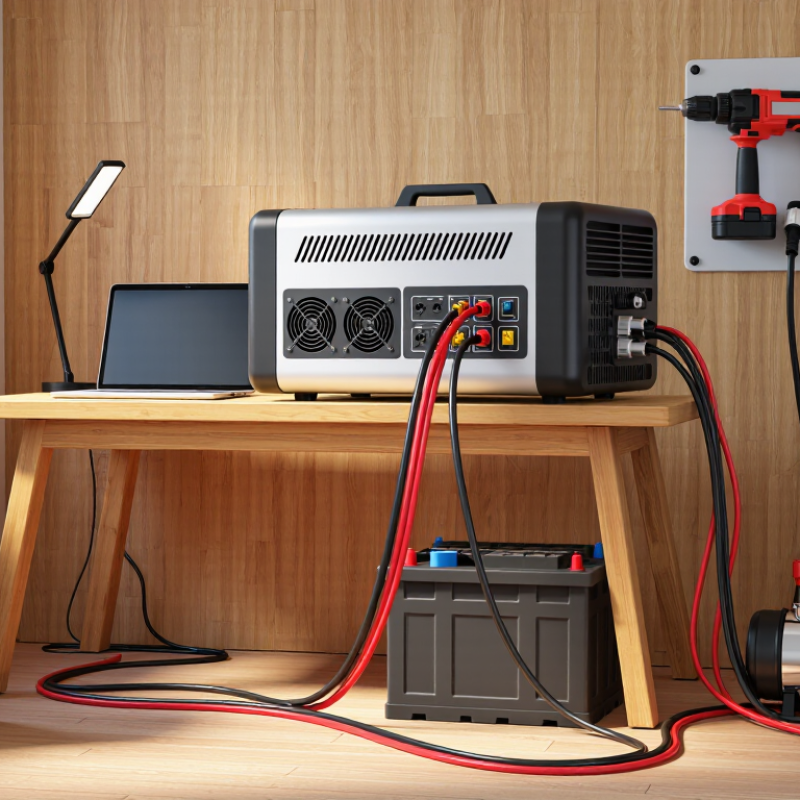
Before choosing a voltage inverter, list every device you expect to run at the same time. Read each nameplate for watts, volts, and amps; do not rely on a product’s usual power draw. The U.S. Department of Energy’s Energy Saver guide, “Estimating Appliance and Home Electronic Energy Use,” explains how to estimate energy from wattage and operating hours. Small loads add up. A 90-watt laptop, 15-watt router, and 10-watt lamp require 115 watts continuously.
Then check startup demand. Motors in refrigerators, pumps, and some tools can briefly draw much more power than their running rating. Note both continuous and surge capacity on the inverter’s specification sheet. For example, a device drawing 600 watts while running may need a higher short-term allowance at startup. I sometimes underestimate this part. A quick inventory beside the outlet is more reliable than memory.
Consider how long the devices must operate, too. Add their wattage, then estimate runtime in hours to understand energy demand; the battery must supply that energy, with conversion losses included. The U.S. DOE guide supports this watt-hour approach, while National Renewable Energy Laboratory inverter-performance modeling examines efficiency under different operating conditions. That matters because an inverter may perform differently at light and heavy loads. Check whether sensitive electronics require a stable, pure sine-wave output, and leave practical headroom rather than sizing exactly to the sum. I would still verify the figures against the actual labels.
How to Choose a Voltage Inverter for Your Needs - Identify Your Devices and Power Requirements
| Example Use Case |
Devices Running at the Same Time |
Estimated Combined Running Load |
Estimated Combined Startup Surge |
Suggested Inverter Rating |
Why This Rating Fits |
| Small work setup |
Laptop: 65 W; monitor: 30 W; router: 12 W; LED lights: 20 W |
127 W |
About 127 W |
At least 200 W continuous; 300 W surge |
Provides operating headroom above the estimated load. These devices generally have little startup surge. |
| Basic home backup |
Refrigerator: 150 W; microwave: 1,500 W input; LED light: 10 W |
1,660 W |
About 2,110 W |
At least 2,200 W continuous; 3,000 W surge |
Allows for the refrigerator compressor’s startup demand while the other listed devices are operating. |
| Workshop tools |
Circular saw: 1,400 W; shop vacuum: 1,000 W; work light: 20 W |
2,420 W |
Up to about 5,320 W if both motors start together |
At least 3,000 W continuous; 6,000 W surge |
The surge rating accounts for a conservative case in which both motor-driven tools start at the same time. Starting them separately can reduce the peak demand. |
| RV essentials |
Refrigerator: 150 W; CPAP machine: 60 W; laptop: 65 W; LED lights: 20 W |
295 W |
About 785 W |
At least 500 W continuous; 1,000 W surge |
Provides headroom for the refrigerator compressor’s startup while supporting the other listed loads. |
Planning note: Wattages are typical estimates, not guaranteed specifications. Check each device’s nameplate or manual, and use input watts where available. Add the running watts of devices expected to operate simultaneously, then check the inverter’s continuous and surge ratings. Actual startup demand varies by appliance. These examples do not calculate battery capacity, runtime, or inverter losses.
Choose the Right Inverter Type and Waveform
Choose the inverter architecture to match your power source. A stand-alone unit serves battery-based systems; a grid-tied unit works with utility power. A hybrid model can manage both, but backup operation depends on its design and setup. A grid-tied unit may shut down during an outage unless it supports backup operation.
Waveform matters to the equipment you plug in. Pure sine wave output is a safer choice for sensitive electronics, variable-speed tools, and many motor loads. Modified sine wave units may suit simple resistive loads, but some devices can hum, run hot, or charge poorly. NREL’s 2024 Annual Technology Baseline uses roughly 98% as a representative utility-scale PV inverter efficiency assumption. That figure describes modeled conversion efficiency, not waveform quality or small-inverter performance. Check the actual unit’s specifications. A label can still leave gaps.
Tips: List each load’s watts and startup surge, then compare both with the inverter’s continuous and peak ratings. Check voltage, frequency, and waveform requirements in device manuals. If a refrigerator or laptop is involved, pure sine is usually the less risky choice. I still verify the charger details; assumptions are easy to make.
How to Choose a Voltage Inverter: Compare Output Waveforms
Choose a pure sine wave inverter for equipment that specifies sine-wave power, including many motors and sensitive electronics. Modified sine wave output is stepped and may not suit every device; a square wave is included here as a basic waveform comparison, not as a recommendation. The curves show normalized, illustrative waveform shapes—not measured inverter output or voltage ratings. Check your equipment’s requirements before choosing an inverter.
Match Input Voltage and Output Capacity
Before comparing inverter capacities, confirm the voltage of the battery or other DC source. A 12-volt inverter cannot safely substitute for a 24-volt model just because both have the same watt rating. Check the source label and the equipment manual. Check the label. On the AC side, match the inverter’s output voltage and frequency to the devices you plan to use. A mismatch can cause poor performance or damage, so do not rely on plug shape alone.
Next, estimate the combined wattage of devices that may run at the same time. Use their input ratings, not just the power printed on a charger. Motors, pumps, and refrigerators can briefly draw much more power when starting. Allow some headroom.
Compare both the inverter’s continuous rating and its surge rating with those demands; a high surge figure does not mean it can supply that power for long. This is where estimates get messy: a kettle and a small laptop charger have very different load patterns.
Also remember that inverter capacity is not battery runtime. Runtime depends on battery capacity, load, and conversion losses. If a device’s startup demand is unclear, check its manual or ask a qualified electrician before choosing.
Assess Efficiency, Safety, and Installation Needs
How to Choose a Voltage Inverter for Your Needs
Assess Efficiency, Safety, and Installation Needs
Choose an inverter based on your actual loads, not its advertised peak rating. Add the running wattage of connected devices, then allow for startup surges from pumps, refrigerators, or power tools. NREL’s PVWatts technical documentation uses 96% as a default inverter efficiency. Treat that figure as a modeling benchmark, not a guarantee: efficiency varies with load, heat, and wiring losses. An oversized inverter may also operate inefficiently when loads are small.
Safety deserves equal attention. Match the inverter’s DC input voltage to your battery or power source, and select cables for the current and cable length. Check for overload, short-circuit, over-temperature, and low-voltage protection. NREL’s photovoltaic inverter reliability research discusses environmental stress and thermal cycling as factors in equipment wear. Keep ventilation openings clear; a dusty cupboard or hot vehicle compartment can trap heat. Small details matter.
Installation needs can change which inverter fits best. Measure the cable route, leave space around the enclosure, and have a qualified installer check grounding and disconnect requirements. Compare continuous output, surge duration, efficiency curves, and enclosure ratings—not just the largest number on the casing. For a cabin, quiet operation and an accessible fuse may matter more than a small efficiency gain. Worth checking. Revisit your load list before installation; chargers and startup surges are easy to overlook.
Compare Features, Durability, and Cost
When comparing voltage inverters, start with the equipment they must run. Add the running wattage of each device, then allow for motors that draw extra power at startup. A refrigerator, for example, may briefly need far more than its steady rating. Check both continuous and surge ratings. Check the label. Also confirm that the inverter’s input voltage matches your battery system and that its output suits your appliances. Sensitive electronics often work better with a pure sine wave, though the extra cost may not be worthwhile for every load.
Durability depends on more than a sturdy-looking case. Look for over-temperature, overload, and low-voltage protection, plus ventilation that can move heat away during sustained use. In a vehicle or dusty workspace, mounting position matters: blocked vents can shorten service life. Cable size and connection quality matter too. A strong inverter connected through thin cables may waste power and run hot. This detail is easy to overlook.
Compare the purchase price with the features you will actually use. A model with a higher surge rating, quieter cooling, or clearer status display can be useful, but unused capacity still costs money. Read the warranty terms and check whether replacement cables or installation hardware are included. Ratings can also be confusing across products, so verify the figures against your devices’ manuals rather than relying on a broad “high power” claim. My own first estimate would probably include too much spare capacity; measuring real loads can prevent that.